 |
| 開啟輕鬆換主題app open RelaxedThemeChange app |
 |
| 點擊 分享 Click to Share |
 |
| 往下拉 Pull down |
 |
| 使用Line分享 Share with Line |
 |
| 選擇要分享的對象 Select the object you want to share |
 |
| 你確定傳送嗎? 確定 click OK |
 |
| 點擊傳送 click Send |
 |
| 分享成功 Share Success |
|
| 開啟輕鬆換主題app open RelaxedThemeChange app |
|
| 點擊 分享 Click to Share |
|
| 往下拉 Pull down |
|
| 使用Line分享 Share with Line |
|
| 選擇要分享的對象 Select the object you want to share |
|
| 你確定傳送嗎? 確定 click OK |
|
| 點擊傳送 click Send |
|
| 分享成功 Share Success |
 |
| 開啟輕鬆換主題app open RelaxedThemeChange app |
 |
| 本app只提供教學 讓更換主題變方便 line主題需要自行去下載 |
 |
| 點擊 選擇記憶卡上的主題 Choose Themes on the memory card |
 |
| 找到想要新增到最愛的副主題 長按 To find the subject you want to add to your favorites long time press |
 |
| 輸入一個容易辨別的名字 Enter a name is easy to identify |
 |
| 例如:ksori EX:ksori |
 |
| 顯示加到最愛成功 Shown add the success |
 |
| 到我的最愛看看 Choose Favorites |
 |
| 新增成功 add success |
 | |
| 從未使用過LINE的兔兔主題 請先開啟LINE 點選其它 再點選設定 如果有使用用過 LINE的兔兔主題可以往下跳至 開啟LINE 簡單換主題 開始看 Never used the Bunny theme LINE Open LINE app Click More...Click Settings If you have used the line theme can be used down jump Easy to change the theme on LINE Start watching |
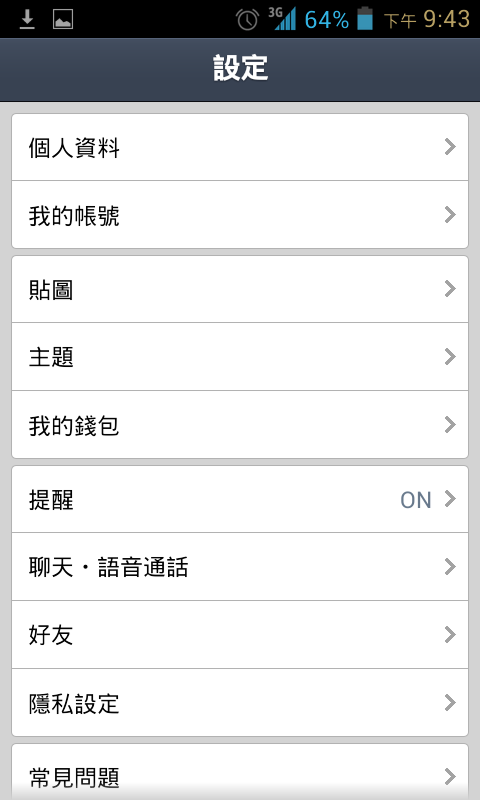 |
| 點選主題 Click Thmes |
 | |
| 兔兔主題 尚未下載 請先點擊下載 如果兔兔主題是顯示套用 代表已經有下載過了 Cony theme yet downloaded Please click to downloadCony Theme show Apply Representatives have downloaded |
 | |
| 下載完畢會跳出 是否套用 先不套用 如果不小心點擊套用了 請再點擊其它 點擊設定 點擊主題 再套用基本的主題
Whether to apply the download is complete will pop
To not apply If you accidentally click on the Apply Please click other Click on Settings Click on the subject Then apply the basic theme |
 | |
| 完成後 準備開啟 LINE簡單換主題 Completion Open RelaxedThemeChange app |
 |
| 開啟LINE簡單換主題後 點選 選擇網路上的主題 Open RelaxedThemeChange app |
 |
| 出現副主題列表 星星如果有亮起來 代表已經下載完成了 如果想刪除副主題 請長按想刪除的副主題 這邊使用小香副主題作範例 |
 | ||
| 點擊後出現下載訊息 按下確定 |
 | |
| 等待下載完成 |
 |
| 小香主題 下載完成 右邊的星星也亮起來了 |
 |
| 再點選一次小香主題 點選確定後 就會重新開啟LINE |
 |
| 點選右上角其它 |
|
| 點選設定 |
|
| 點選主題 |
|
| 點選兔兔 下方套用按鈕 重新啟動LINE 就成功了 如果無法套用 請再切回基本 再切一次兔兔主題 p.s.粉紅兔兔為何沒有改圖 謎之音)因為開發者偷懶 |
 |
| LINE重新啟動的畫面 這樣賣火柴 會不會缺貨阿? |
 |
| 這樣就完成主題的套用了 其它也是用一樣的方法 |
 |
開啟 LINE 開啟輕鬆換主題
看到推薦網路上的主題 點擊
Open RelaxedThemeChange app click Recommend WEB page |
 |
以作者KC 的多啦A夢 副主題當範例
點開超連結
use Author KC Doraemon theme when the sample Open link |
 |
| 瀏覽網頁內容 Browse Web Content |
 |
| 如果覺的 作者KC 作的不錯的話 要記的去 FB按個讚喔! If you think the theme of KC's very good Go to FB by a good Oh! |
 |
| 副主題預覽 Theme Preview |
 |
| 看到下載連結了 點擊進去See the download link Click to go |
 |
| 近入了Google的雲端硬碟 點下載 Click to download into Google Drive |
 |
| 瀏覽器就會在上方的工作列 顯示開始下載 下載完成後 大概記一下前面的名字就好 完整格式是XXXXXXX.bin喔 Will be at the top of the browser task bar To start the downloadAfter the download is complete Remember downloading the file nameFull format is XXXXXXX.bin Oh |
 |
| 接這開啟文件管理的軟體 沒有的話去play商店下載 類似檔案總管的軟體都可以 Take this open document management app If not, go play store downloadSimilar Explorer software can be |
 |
| 現在要去找下載後的檔案位置 Go after downloading the file location |
 |
| 正常都會在Dowmload的資料夾中 Normal will be in Dowmload folder |
 |
| 剛剛的檔案使是0B0zXXXXX....bin 將它重新命名 Just downloaded file is 0B0zXXXXX .... binRename it |
 |
| 用個你記的住的檔名罷 記的檔案名稱要有關鍵字themefile Use the file name to remember File name should contain keywords themefile |
 |
| 確定 Enter |
 | ||
| 重新命名成功
Rename success
|
| ||||
點選設定Click More
|
|
| 先不用點選套用 如果不小心點到套用了 則需要再點一次設定 點選主題 再套用回基本的主題 First do not click Apply If you are not careful to apply the You need to once again point set Click the Themes Then apply to the basic Themes |
 |
| 這開啟Line輕鬆換主題 appOpen RelaxedThemeChange app |
 |
| 點選 記憶卡上的主題 路徑就在剛剛下載的 Download資料夾 Click Themes on the memory cardPath in just downloadedDownload folder |
 |
| 點選哆拉a夢主題 接這會自動開啟Line Just click on the theme of naming Then it will automatically open Line app |
 |
| 點選其它 Click More |
| ||
點選設定Click Settings
|
 |
| 再點選套用 就完成了 Click Cony Apply 如果已經是兔兔主題的 那就需要再切換一次基本 或是熊大主題後 再切換一次兔兔主題 If you are already Cony Theme It would need a basic theme and then switch Then switch once Bunny Theme |
 |
| 如果覺得 作者KC 的副主題不錯的話 記的去KC FB點個讚幫作者打氣喔 If you think the theme of KC's very good Go to FB by a good Oh! |
